


Keeping factory sub when adding aftermarket headunit (99' - 03' TL)


Thread Starter
Banned
Joined: May 2000
Posts: 2,849
Likes: 6
From: New Jersey
Keeping factory sub when adding aftermarket headunit (99' - 03' TL)
I've gotten a lot of requests asking how you do this since the wire harness and aftermarket headunit lose the control over the factory sub. The solution is quite simple actually.
If you pop out the back seat to gain access to the factory sub amp, you'll see a connector going into the amp and 2 of the wires will be as follows:
blue with a green trace (+)
-and-
orange with a blue trace (-)
All you need to do is run an RCA cable from your aftermarket headunits subwoofer output and connect it to the above two wires accordingly. For those who don't quite understand, you basically cut the end off the RCA cable that you've just run to the factory subwoofer amp and the center leg of this cable will connect to the blue/green wire and the shield to the orange/blue wire.
You could do this right behind the headunit at the EQ unit, but, there are a couple blue/green and a couple orange/blue and I didn't want to confuse anyone
Nice thing about this is with an aftermarket headunit w/subwoofer out, you'll now have seperate volume control over the factory sub.
Hope that helps some of you out!
If you pop out the back seat to gain access to the factory sub amp, you'll see a connector going into the amp and 2 of the wires will be as follows:
blue with a green trace (+)
-and-
orange with a blue trace (-)
All you need to do is run an RCA cable from your aftermarket headunits subwoofer output and connect it to the above two wires accordingly. For those who don't quite understand, you basically cut the end off the RCA cable that you've just run to the factory subwoofer amp and the center leg of this cable will connect to the blue/green wire and the shield to the orange/blue wire.
You could do this right behind the headunit at the EQ unit, but, there are a couple blue/green and a couple orange/blue and I didn't want to confuse anyone
Nice thing about this is with an aftermarket headunit w/subwoofer out, you'll now have seperate volume control over the factory sub.
Hope that helps some of you out!


Originally Posted by StreetEffectz
I've gotten a lot of requests asking how you do this since the wire harness and aftermarket headunit lose the control over the factory sub. The solution is quite simple actually.
If you pop out the back seat to gain access to the factory sub amp, you'll see a connector going into the amp and 2 of the wires will be as follows:
blue with a green trace (+)
-and-
orange with a blue trace (-)
All you need to do is run an RCA cable from your aftermarket headunits subwoofer output and connect it to the above two wires accordingly. For those who don't quite understand, you basically cut the end off the RCA cable that you've just run to the factory subwoofer amp and the center leg of this cable will connect to the blue/green wire and the shield to the orange/blue wire.
You could do this right behind the headunit at the EQ unit, but, there are a couple blue/green and a couple orange/blue and I didn't want to confuse anyone
Nice thing about this is with an aftermarket headunit w/subwoofer out, you'll now have seperate volume control over the factory sub.
Hope that helps some of you out!
If you pop out the back seat to gain access to the factory sub amp, you'll see a connector going into the amp and 2 of the wires will be as follows:
blue with a green trace (+)
-and-
orange with a blue trace (-)
All you need to do is run an RCA cable from your aftermarket headunits subwoofer output and connect it to the above two wires accordingly. For those who don't quite understand, you basically cut the end off the RCA cable that you've just run to the factory subwoofer amp and the center leg of this cable will connect to the blue/green wire and the shield to the orange/blue wire.
You could do this right behind the headunit at the EQ unit, but, there are a couple blue/green and a couple orange/blue and I didn't want to confuse anyone
Nice thing about this is with an aftermarket headunit w/subwoofer out, you'll now have seperate volume control over the factory sub.
Hope that helps some of you out!

10th Gear
Joined: Jan 2006
Posts: 10
Likes: 0
Originally Posted by StreetEffectz
I've gotten a lot of requests asking how you do this since the wire harness and aftermarket headunit lose the control over the factory sub. The solution is quite simple actually.
If you pop out the back seat to gain access to the factory sub amp, you'll see a connector going into the amp and 2 of the wires will be as follows:
blue with a green trace (+)
-and-
orange with a blue trace (-)
All you need to do is run an RCA cable from your aftermarket headunits subwoofer output and connect it to the above two wires accordingly. For those who don't quite understand, you basically cut the end off the RCA cable that you've just run to the factory subwoofer amp and the center leg of this cable will connect to the blue/green wire and the shield to the orange/blue wire.
You could do this right behind the headunit at the EQ unit, but, there are a couple blue/green and a couple orange/blue and I didn't want to confuse anyone
Nice thing about this is with an aftermarket headunit w/subwoofer out, you'll now have seperate volume control over the factory sub.
Hope that helps some of you out!
If you pop out the back seat to gain access to the factory sub amp, you'll see a connector going into the amp and 2 of the wires will be as follows:
blue with a green trace (+)
-and-
orange with a blue trace (-)
All you need to do is run an RCA cable from your aftermarket headunits subwoofer output and connect it to the above two wires accordingly. For those who don't quite understand, you basically cut the end off the RCA cable that you've just run to the factory subwoofer amp and the center leg of this cable will connect to the blue/green wire and the shield to the orange/blue wire.
You could do this right behind the headunit at the EQ unit, but, there are a couple blue/green and a couple orange/blue and I didn't want to confuse anyone
Nice thing about this is with an aftermarket headunit w/subwoofer out, you'll now have seperate volume control over the factory sub.
Hope that helps some of you out!
Thanks.
daven

2013 sh-awd adv
Joined: Sep 2005
Posts: 101
Likes: 12
From: houston, tx
Originally Posted by daven
Could you explain how to use the RCA wire from the subwoofer output right behind the head unit when trying to maintain the subwoofer while changing the head unit? I have diagrams of the 2nd gen TL wo navi.
Thanks.
daven
Thanks.
daven
look for the
blue with a green trace wire(+)
-and-
orange with a blue trace wire(-)
and connect it to the above two wires accordingly.
To do this, you basically cut the end off the RCA cable that you've just run to the factory subwoofer amp and the center leg of this cable will connect to the blue/green wire and the shield to the orange/blue wire. (kind of like a regular co-axle cable.

1st Gear
Joined: May 2005
Posts: 1
Likes: 1
unsuccessful hooking up factory sub...
I have put in a new deck and amp and everything is good. I just hooked up the bose amp as stated below. found that the bose amp wasn't turning on so i managed to find the wire(another orange) that was the remote wire. So i got it to turn on but no sound is coming from the stock sub. It does pop a bit when it turns on and will make a hiss if i disconnect either the + or - signal to the bose amp. I did try it from the sub out right and left, same story.
i have turned the decks subwoofer up all the way hoping that would help. no luck
Any advice? any test i can do to isolate the issue?
How can i test that the subwoofer signal from the rca to the bose amp is strong enough or working?
Thanks for all the posts, everyone has helped a lot...
2002 TL-S
i have turned the decks subwoofer up all the way hoping that would help. no luck
Any advice? any test i can do to isolate the issue?
How can i test that the subwoofer signal from the rca to the bose amp is strong enough or working?
Thanks for all the posts, everyone has helped a lot...
2002 TL-S
Originally Posted by StreetEffectz
I've gotten a lot of requests asking how you do this since the wire harness and aftermarket headunit lose the control over the factory sub. The solution is quite simple actually.
If you pop out the back seat to gain access to the factory sub amp, you'll see a connector going into the amp and 2 of the wires will be as follows:
blue with a green trace (+)
-and-
orange with a blue trace (-)
All you need to do is run an RCA cable from your aftermarket headunits subwoofer output and connect it to the above two wires accordingly. For those who don't quite understand, you basically cut the end off the RCA cable that you've just run to the factory subwoofer amp and the center leg of this cable will connect to the blue/green wire and the shield to the orange/blue wire.
You could do this right behind the headunit at the EQ unit, but, there are a couple blue/green and a couple orange/blue and I didn't want to confuse anyone
Nice thing about this is with an aftermarket headunit w/subwoofer out, you'll now have seperate volume control over the factory sub.
Hope that helps some of you out!
If you pop out the back seat to gain access to the factory sub amp, you'll see a connector going into the amp and 2 of the wires will be as follows:
blue with a green trace (+)
-and-
orange with a blue trace (-)
All you need to do is run an RCA cable from your aftermarket headunits subwoofer output and connect it to the above two wires accordingly. For those who don't quite understand, you basically cut the end off the RCA cable that you've just run to the factory subwoofer amp and the center leg of this cable will connect to the blue/green wire and the shield to the orange/blue wire.
You could do this right behind the headunit at the EQ unit, but, there are a couple blue/green and a couple orange/blue and I didn't want to confuse anyone
Nice thing about this is with an aftermarket headunit w/subwoofer out, you'll now have seperate volume control over the factory sub.
Hope that helps some of you out!

Trending Topics

5th Gear
Joined: Dec 2005
Posts: 5
Likes: 0
Originally Posted by TLatVULS
Street, this workaround is only for maintaining CONTROL for the level of the sub, right? I mean, with a metra harness the sub should still receive a signal through the stock wiring.
To get access to the Bose EQ wiring harness, you need to disconnect the radio bracket (four screws, two behind climate controls) and rotate the Bose EQ box down and out. Use the pinout diagram (here, under schematics) to find the proper wires to splice into (pins 3+ and 10- IIRC). You also need to remember to hook up the "power antenna/amp remote" lead on the Metra harness in order to signal the sub amp to turn on.

peer2peer
Joined: Feb 2006
Posts: 5
Likes: 1
Originally Posted by wendland99
I have put in a new deck and amp and everything is good. I just hooked up the bose amp as stated below. found that the bose amp wasn't turning on so i managed to find the wire(another orange) that was the remote wire. So i got it to turn on but no sound is coming from the stock sub. It does pop a bit when it turns on and will make a hiss if i disconnect either the + or - signal to the bose amp. I did try it from the sub out right and left, same story.
i have turned the decks subwoofer up all the way hoping that would help. no luck
Any advice? any test i can do to isolate the issue?
How can i test that the subwoofer signal from the rca to the bose amp is strong enough or working?
Thanks for all the posts, everyone has helped a lot...
2002 TL-S
i have turned the decks subwoofer up all the way hoping that would help. no luck
Any advice? any test i can do to isolate the issue?
How can i test that the subwoofer signal from the rca to the bose amp is strong enough or working?
Thanks for all the posts, everyone has helped a lot...
2002 TL-S
Once you confirm that power is going to your amp, you know it is on. The only reason you have no sound from your subwoofer is because there is no signal going to the amp. We need to provide a signal and we can do this by taking the subwoofer signal from the aftermarket head unit and running it directly to the subwoofer amp. Your aftermarket unit should have a female rca plug labled subwoofer. Some units have a pair, right and left channel. For subwoofers, you do not need a stereo signal (it actually sounds better in mono) so get a long rca patch cable that will reach back to your trunk, even when concealed. Connect one end to your subwoofer output and head toward your trunk. Get a wire cutter and cut off the plug on the other end of the rca cable. Strip the wire to expose the inside conductor and the outside conductor separately. The inside conductor is your positive lead, the outside one is the negative lead. Now locate the corresponding wires on the subwoofer harness plug. Refer to the wiring harness diagram located elsewere in this thread. You cannot rely on the descriptions of the wire colors - mine did not match those in the original instructions provided by StreetEffectz. The harness diagram was accurate. The diagram shows which of the wires in the subwoofer amp harness are to be used - the positive and negative signal wires are adjacent to each other. Once you locate these wires, do not cut them - just strip the wires back to expose the conductors and either twist on or solder the corresponding wire from your rca signal cable. Of course, use electrical tape to cover any exposed wire, plug the harness back into the subwoofer amp and power up your headunit. Make sure your subwoofer output is turned on at your headunit and you should hear your sub playing. You can visually confirm this from inside the trunk.
Take your time and refer to the wire diagrams. This WILL work. Good luck!
2001 3.2 TL w/nav
Last edited by peer2peer; Oct 14, 2006 at 09:40 AM.
5th Gear
Joined: Dec 2005
Posts: 5
Likes: 0
From the wiring schematics, it looks like the orange "Radio-switched power" lead goes directly to the subwoofer amp. I'd be surprised if you didn't need to connect that lead to get the sub amp to switch on with the radio (but I've been surprised before).
If you don't want to go to the trouble of concealing a long RCA connection to the sub amp, just follow my post above and intercept the sub signal wires at the Bose EQ harness.
Now I just need to troll through these threads to ifgure out what the best replacement speakers are for my '99 TL (I'd prefer a drop-in solution). According to Crutchfield, my choices are very limited. Any suggestions?
If you don't want to go to the trouble of concealing a long RCA connection to the sub amp, just follow my post above and intercept the sub signal wires at the Bose EQ harness.
Now I just need to troll through these threads to ifgure out what the best replacement speakers are for my '99 TL (I'd prefer a drop-in solution). According to Crutchfield, my choices are very limited. Any suggestions?

Advanced
Joined: Dec 2001
Posts: 65
Likes: 1
 Summary
I just thought I would try and summarize this into a single list. Someone mind double-checking me?
- Connect new head-unit to car's factory harness using Metra harness
- Connect Remote wire from harness to factory "orange" (or appropriate color) remote turn-on wire
- Connect RCA sub-out from head-unit to Bose amp's signal wires (at Bose EQ or at Amp) using wiring diagram

5th Gear
Joined: Dec 2006
Posts: 5
Likes: 0
Max voltage input at stock amplifier?
Originally Posted by TLatVULS
I just thought I would try and summarize this into a single list. Someone mind double-checking me?
- Connect new head-unit to car's factory harness using Metra harness
- Connect Remote wire from harness to factory "orange" (or appropriate color) remote turn-on wire
- Connect RCA sub-out from head-unit to Bose amp's signal wires (at Bose EQ or at Amp) using wiring diagram
I've just read through this thread and a few other ones, and I believe this is a correct summary of what to do. My only question is: what is the input signal requirement at the stock amplifier? I think, even if splicing the sub-out from the new head unit into the signal wires going to the Bose amp works, I am wondering if the signal needs to be conditioned first, for best sound.
I know that the Bose amp on other car makes, is actually expecting a differential signal input with 4V max amplitude. Does anyone know the specifications for the signal input requirement into the Bose amp in the Acura TL? If it is 4V max, then I would supposed the a head unit with pre-outs of 4V would be a good mactch. Does this sound right? Also, would a converter that can convert the open ended signal from the head unit's pre-out into a differential signal help in reducing noise in the signal to the amp? I am looking at using this device in the signal path from the head unit's sub pre-out to the amplifier:
http://www.cardomain.com/item/PERSVEN2
I'm planning to install a new head unit in my girlfriend's 1999 Acura TL and am doing some research here. I'd appreciate any help.

9th Gear
Joined: Dec 2006
Posts: 9
Likes: 2
From: Palo Alto, CA
 Definitive Solution
Originally Posted by TLatVULS
I just thought I would try and summarize this into a single list. Someone mind double-checking me?
- Connect new head-unit to car's factory harness using Metra harness
- Connect Remote wire from harness to factory "orange" (or appropriate color) remote turn-on wire
- Connect RCA sub-out from head-unit to Bose amp's signal wires (at Bose EQ or at Amp) using wiring diagram
- NEW: Connect Remote wire from your headunit to the "Antenna Turn-On" from the Metra harness.
Basically, our TLs do not have a power antenna, so that pin actually tells the amp just to turn on, but not to start playing; sortof like its standby mode. The orange wire from the EQ just tells it to come out of standby mode and start playing. You'll actually notice that you'll hear little thumps when changing sources and skipping tracks. I bet the Bose EQ used to tell the amp to go into standby mode at those times.
I found this out by accident by trying to connect the "Antenna Turn-On" lead from the Metra Harness to the headunit's "Power Antenna" wire while in tuner mode. The reception didn't change whatsoever, but I heard a subtle little click where the amp should be. So I tried just putting the "Power Antenna" from the Metra harness to the "Remote Turn-On" wire from the headunit. I then tried connecting the RCA sub lines, but still nothing... but there was loud thumping when I connect the lines. I knew I was close. Finally, I also put the orange EQ wire to headunit's "Remote Turn-on" as well. That did it!
I hope this finally puts this to rest.
One more thing, you DO NOT need to attach the grey "shielding" wire from the EQ to ground. It didn't make a difference.


Originally Posted by bobbbio
I finally have the DEFINITIVE answer on how to connect the BOSE sub to an aftermarket headunit (I actually found it out by accident):
Basically, our TLs do not have a power antenna, so that pin actually tells the amp just to turn on, but not to start playing; sortof like its standby mode. The orange wire from the EQ just tells it to come out of standby mode and start playing. You'll actually notice that you'll hear little thumps when changing sources and skipping tracks. I bet the Bose EQ used to tell the amp to go into standby mode at those times.
I found this out by accident by trying to connect the "Antenna Turn-On" lead from the Metra Harness to the headunit's "Power Antenna" wire while in tuner mode. The reception didn't change whatsoever, but I heard a subtle little click where the amp should be. So I tried just putting the "Power Antenna" from the Metra harness to the "Remote Turn-On" wire from the headunit. I then tried connecting the RCA sub lines, but still nothing... but there was loud thumping when I connect the lines. I knew I was close. Finally, I also put the orange EQ wire to headunit's "Remote Turn-on" as well. That did it!
I hope this finally puts this to rest.
One more thing, you DO NOT need to attach the grey "shielding" wire from the EQ to ground. It didn't make a difference.
- Connect new head-unit to car's factory harness using Metra harness
- Connect Remote wire from harness to factory "orange" (or appropriate color) remote turn-on wire
- Connect RCA sub-out from head-unit to Bose amp's signal wires (at Bose EQ or at Amp) using wiring diagram
- NEW: Connect Remote wire from your headunit to the "Antenna Turn-On" from the Metra harness.
Basically, our TLs do not have a power antenna, so that pin actually tells the amp just to turn on, but not to start playing; sortof like its standby mode. The orange wire from the EQ just tells it to come out of standby mode and start playing. You'll actually notice that you'll hear little thumps when changing sources and skipping tracks. I bet the Bose EQ used to tell the amp to go into standby mode at those times.
I found this out by accident by trying to connect the "Antenna Turn-On" lead from the Metra Harness to the headunit's "Power Antenna" wire while in tuner mode. The reception didn't change whatsoever, but I heard a subtle little click where the amp should be. So I tried just putting the "Power Antenna" from the Metra harness to the "Remote Turn-On" wire from the headunit. I then tried connecting the RCA sub lines, but still nothing... but there was loud thumping when I connect the lines. I knew I was close. Finally, I also put the orange EQ wire to headunit's "Remote Turn-on" as well. That did it!
I hope this finally puts this to rest.
One more thing, you DO NOT need to attach the grey "shielding" wire from the EQ to ground. It didn't make a difference.
and about grounding the gray wire, are you talking about 'b5'?

are there any other wires you need to ground? either from that same "b-series" harness or the harness back at the stock amp?

6th Gear
Joined: May 2006
Posts: 6
Likes: 0
Originally Posted by bobbbio
I finally have the DEFINITIVE answer on how to connect the BOSE sub to an aftermarket headunit (I actually found it out by accident):
Basically, our TLs do not have a power antenna, so that pin actually tells the amp just to turn on, but not to start playing; sortof like its standby mode. The orange wire from the EQ just tells it to come out of standby mode and start playing. You'll actually notice that you'll hear little thumps when changing sources and skipping tracks. I bet the Bose EQ used to tell the amp to go into standby mode at those times.
I found this out by accident by trying to connect the "Antenna Turn-On" lead from the Metra Harness to the headunit's "Power Antenna" wire while in tuner mode. The reception didn't change whatsoever, but I heard a subtle little click where the amp should be. So I tried just putting the "Power Antenna" from the Metra harness to the "Remote Turn-On" wire from the headunit. I then tried connecting the RCA sub lines, but still nothing... but there was loud thumping when I connect the lines. I knew I was close. Finally, I also put the orange EQ wire to headunit's "Remote Turn-on" as well. That did it!
I hope this finally puts this to rest.
One more thing, you DO NOT need to attach the grey "shielding" wire from the EQ to ground. It didn't make a difference.
- Connect new head-unit to car's factory harness using Metra harness
- Connect Remote wire from harness to factory "orange" (or appropriate color) remote turn-on wire
- Connect RCA sub-out from head-unit to Bose amp's signal wires (at Bose EQ or at Amp) using wiring diagram
- NEW: Connect Remote wire from your headunit to the "Antenna Turn-On" from the Metra harness.
Basically, our TLs do not have a power antenna, so that pin actually tells the amp just to turn on, but not to start playing; sortof like its standby mode. The orange wire from the EQ just tells it to come out of standby mode and start playing. You'll actually notice that you'll hear little thumps when changing sources and skipping tracks. I bet the Bose EQ used to tell the amp to go into standby mode at those times.
I found this out by accident by trying to connect the "Antenna Turn-On" lead from the Metra Harness to the headunit's "Power Antenna" wire while in tuner mode. The reception didn't change whatsoever, but I heard a subtle little click where the amp should be. So I tried just putting the "Power Antenna" from the Metra harness to the "Remote Turn-On" wire from the headunit. I then tried connecting the RCA sub lines, but still nothing... but there was loud thumping when I connect the lines. I knew I was close. Finally, I also put the orange EQ wire to headunit's "Remote Turn-on" as well. That did it!
I hope this finally puts this to rest.
One more thing, you DO NOT need to attach the grey "shielding" wire from the EQ to ground. It didn't make a difference.
And, if I splice the rca cable and want to wire it to the equalizer behind the climate controls where do the two wires go?
And, Connect Remote wire from your headunit to the "Antenna Turn-On" from the Metra harness? What color is the remote wire from the headunit.
Does anyone have any pics?????? Thanks for the great post, I hope to get this working.
Originally Posted by flaxion10
Ok, i am still a bit confused..... What wire coming from the metra harness do I connect to the orange (or appropriate) remote turn on wire?
And, if I splice the rca cable and want to wire it to the equalizer behind the climate controls where do the two wires go?
And, Connect Remote wire from your headunit to the "Antenna Turn-On" from the Metra harness? What color is the remote wire from the headunit.
Does anyone have any pics?????? Thanks for the great post, I hope to get this working.
And, if I splice the rca cable and want to wire it to the equalizer behind the climate controls where do the two wires go?
And, Connect Remote wire from your headunit to the "Antenna Turn-On" from the Metra harness? What color is the remote wire from the headunit.
Does anyone have any pics?????? Thanks for the great post, I hope to get this working.
cut the rca just as streeteffectz mentioned. the center of the rca get wired to the b/g wire on the amp harness. the outer shield is connected to the o/b wire on the same amp harness. then finally the RTO wire from the new HU's harness gets connected to the orange wire on the amp harness.
as for the rest of the system, you wire the HU's harness to the metra harness as normal... but concerning the wiring of the stock amp/sub to the new HU... the metra harness isnt touched. you only need the single rca wire from the "sub-out" of the HU and the "remote turn-on" from the headunit harness.
Originally Posted by SeCsTaC
So can someone recap the definitive instructions again in this thread? Seems like theres slight confusion with people saying the original post doesn't work, then saying it does work but you just have to do this or do that.
So yeah, for those of you that know for sure what it takes to get it to work, can you post up the exact directions?
So yeah, for those of you that know for sure what it takes to get it to work, can you post up the exact directions?
Originally Posted by stRodda
here is the easiest way. ignore the EQ. run a single rca and the RTO(blue/white, on the harness that came with my kenwood) from the headunit all the way back to the amp that is behind the rear seat. once the seats are taken out, you can run the wires under the carpet easily to conceal them.
cut the rca just as streeteffectz mentioned. the center of the rca get wired to the b/g wire on the amp harness. the outer shield is connected to the o/b wire on the same amp harness. then finally the RTO wire from the new HU's harness gets connected to the orange wire on the amp harness.
as for the rest of the system, you wire the HU's harness to the metra harness as normal... but concerning the wiring of the stock amp/sub to the new HU... the metra harness isnt touched. you only need the single rca wire from the "sub-out" of the HU and the "remote turn-on" from the headunit harness.
cut the rca just as streeteffectz mentioned. the center of the rca get wired to the b/g wire on the amp harness. the outer shield is connected to the o/b wire on the same amp harness. then finally the RTO wire from the new HU's harness gets connected to the orange wire on the amp harness.
as for the rest of the system, you wire the HU's harness to the metra harness as normal... but concerning the wiring of the stock amp/sub to the new HU... the metra harness isnt touched. you only need the single rca wire from the "sub-out" of the HU and the "remote turn-on" from the headunit harness.
5th Gear
Joined: Dec 2005
Posts: 5
Likes: 0
Well ... easiest depends on your particular installation.
For me, it was "easier" to pull down the EQ unit and splice into the existing wiring going to the factory amp because I was only replacing the headunit. It would have been more difficult for me to run the single wire all the way back. The only "difficulty" I faced was getting access to the EQ and locatin it's connector (both of which are described above). The diagrams make it pretty clear that you must send the factory sub a "power on" signal, so that part never tripped me up.
For me, it was "easier" to pull down the EQ unit and splice into the existing wiring going to the factory amp because I was only replacing the headunit. It would have been more difficult for me to run the single wire all the way back. The only "difficulty" I faced was getting access to the EQ and locatin it's connector (both of which are described above). The diagrams make it pretty clear that you must send the factory sub a "power on" signal, so that part never tripped me up.

1st Gear
Joined: Mar 2007
Posts: 1
Likes: 0
can anyone help me out with the wiring? I have the car opened up for work. I have a panasonic head unit in the dash. I have the rca jack to the back and connected to the + (blue on mine) and - (Orange with blue on mine) of the subwoofer amp and i have the orange wire connected to my amp turn on wire from my head unit. Is there anything else I need to do to get this working? My sub is not working. It's real frustrating. Please help.
Roger
2001 acura 3.2TL
Roger
2001 acura 3.2TL
Ackniculous One
Joined: Jun 2003
Posts: 3,100
Likes: 8
From: ATL Shawwwwtyyyy
From what I hear, you can access the amp wires by removing the plastic kick panel by the front pax door and tap in there instead of taking your seat out and running wires all the way to the back...that's what I plan on doing. A couple folks have done that with success.
10th Gear
Joined: Feb 2006
Posts: 13
Likes: 0
From: San Jose
The whole process didnt take me longer than 30 min, but thats after taking my whole center console in and out for more than 5 times, if its possible to locate the amp wires on the door, i would do it that way. But if you think you are pretty confident with taking the console out then I would do it that way since the wires behind the seat are really easy to locate, and you can listen to the "click" sound the amp makes when you turn it on to comfim that theres power runnig through it. If you want i can post a DIY.
5th Gear
Joined: Dec 2005
Posts: 5
Likes: 0
If you access the wires at the equalizer, there is NO rewiring that needs to be done. I did need to convert the RCA subwoofer output from my HU into the two wires that you splice into at the equalizer, but at that point, you are bypassing the EQ and using its output wires to reach the sub behind the back seat. I actually split apart an RCA cable to do mine, but the Radioshack part looks like that would clean up the installation even more.
To test mine, I just temporarily plugged my MP3 player into the RCA connection and listened to the thumping from the subwoofer.
On a side note ... has anyone had to replace the bulb behind their LCD clock yet. Mine burned out a month ago, and I've already picked up the $5 part from Acura, but I can't remember if it's accessible once you pull down the EQ or not. Guess I'll find out soon enough ...
To test mine, I just temporarily plugged my MP3 player into the RCA connection and listened to the thumping from the subwoofer.
On a side note ... has anyone had to replace the bulb behind their LCD clock yet. Mine burned out a month ago, and I've already picked up the $5 part from Acura, but I can't remember if it's accessible once you pull down the EQ or not. Guess I'll find out soon enough ...

7th Gear
Joined: Mar 2007
Posts: 7
Likes: 8
Factory sub working great with aftermarket HU!
OK!
I'm done. Added the Blaupunkt Long Beach DVD43 head unit to my 2003 TL-S today. It went pretty smoothly. I have the stock sub working perfectly and I ran no extra wires anywhere, except behind the head unit.
First, the signal to the sub amp. Behind the HU, I disconnected the POS stock equalizer. I left the wire from the factory HU to the eq disconnected at both ends. I added a 6-inch cable with a male RCA plug to two wires on the connector that used to be connected to the eq, using the schematics I found on here. These two wires are not present on the other end of the cable because they go directly back to the sub amp. I can now say for sure that there is no need to run wires all the way to the back or even over to the kick panel.
Then I got power to the sub amp. Connecting the power antenna lead from the HU to the wire labeled "radio switched power" on the wiring harness was all that was necessary. It's wire A1, orange, on the larger connector that connected to the old HU. It was actually an orange wire to orange wire connection. Yeah, that seemed too easy, so I looked at the schematics carefully before making the connection. I was surprised how easy this was, considering the problems others seemed to be having getting power to their sub amps.
Well, gotta run. My lady's sick tonight so I have time to look at the pics to see what I should post. Maybe I can get them done tonight, if anyone needs them.
Two side notes. One, I did wet sand the front of the Metra installation kit as was advised here. It looks great, much better than before. It didn't at first, it was an ugly light gray color. But I put some Armorall on it which darkened it perfectly and actually didn't make it shine. I'm totaly happy with it.
Second is sort of bad news. The speakers I ordered didn't actually fit even those they were supposed to. Crutchfield is sending me some replacements, which I'll have Tuesday or Wednesday. I was adding 6 1/2" Blaupunkt two-ways. I'll now be adding some Polk Audio db5250 component speakers. The speakers not fitting may be an omen. I should have added component speakers in the first place.
Thanks to all for wealth of info that's here. It sure helps a lot.
I'm done. Added the Blaupunkt Long Beach DVD43 head unit to my 2003 TL-S today. It went pretty smoothly. I have the stock sub working perfectly and I ran no extra wires anywhere, except behind the head unit.
First, the signal to the sub amp. Behind the HU, I disconnected the POS stock equalizer. I left the wire from the factory HU to the eq disconnected at both ends. I added a 6-inch cable with a male RCA plug to two wires on the connector that used to be connected to the eq, using the schematics I found on here. These two wires are not present on the other end of the cable because they go directly back to the sub amp. I can now say for sure that there is no need to run wires all the way to the back or even over to the kick panel.
Then I got power to the sub amp. Connecting the power antenna lead from the HU to the wire labeled "radio switched power" on the wiring harness was all that was necessary. It's wire A1, orange, on the larger connector that connected to the old HU. It was actually an orange wire to orange wire connection. Yeah, that seemed too easy, so I looked at the schematics carefully before making the connection. I was surprised how easy this was, considering the problems others seemed to be having getting power to their sub amps.
Well, gotta run. My lady's sick tonight so I have time to look at the pics to see what I should post. Maybe I can get them done tonight, if anyone needs them.
Two side notes. One, I did wet sand the front of the Metra installation kit as was advised here. It looks great, much better than before. It didn't at first, it was an ugly light gray color. But I put some Armorall on it which darkened it perfectly and actually didn't make it shine. I'm totaly happy with it.
Second is sort of bad news. The speakers I ordered didn't actually fit even those they were supposed to. Crutchfield is sending me some replacements, which I'll have Tuesday or Wednesday. I was adding 6 1/2" Blaupunkt two-ways. I'll now be adding some Polk Audio db5250 component speakers. The speakers not fitting may be an omen. I should have added component speakers in the first place.
Thanks to all for wealth of info that's here. It sure helps a lot.
Ackniculous One
Joined: Jun 2003
Posts: 3,100
Likes: 8
From: ATL Shawwwwtyyyy
Follow up to my issue here. I did not choose to try to wire this behind the head unit and I already ran my remote and two speaker leads to the rear..I DO NOT plan on tearing up my dash again after the install I just had.
I am still unclear on wiring up this damn factory sub, even after all the posts
Basically, I took some pics hoping someone who has wired up the factory sub in the back behind the seat can chime in or better yet draw some circles and repost a pic or two.
Here is what I am trying to figure out.
Here is my BOSE amp behind my backseat.

Here is the wire harness coming down to the amp.

Here is the harness unplugged

Now, the wires for the split rca cable must be bundled inside the thick brown wire on the 2nd pic, because I can't find them.
Then, my remote wire is supposed to connect to an orange wire. I got two orange wires in the harness on both sides! The harness with the thicker wires has two orange wires, one that has a blue stripe. The harness with the thinner wires has two orange wires as well with silver dots/dashes.
WTF am I doing wrong? I also tried the kick panel method with no luck either. In the process somewhere (could be coincidence ), my VSA light stays on now????
Please help, anyone!!!! After laboring on a nice install, I have no sub and it's killin me and I need to know which wires to tap into. I have NAVI and the schematics don't seem to be matching up for me.
Thanks!
I am still unclear on wiring up this damn factory sub, even after all the posts
Basically, I took some pics hoping someone who has wired up the factory sub in the back behind the seat can chime in or better yet draw some circles and repost a pic or two.
Here is what I am trying to figure out.
Here is my BOSE amp behind my backseat.
Here is the wire harness coming down to the amp.
Here is the harness unplugged
Now, the wires for the split rca cable must be bundled inside the thick brown wire on the 2nd pic, because I can't find them.
Then, my remote wire is supposed to connect to an orange wire. I got two orange wires in the harness on both sides! The harness with the thicker wires has two orange wires, one that has a blue stripe. The harness with the thinner wires has two orange wires as well with silver dots/dashes.
WTF am I doing wrong? I also tried the kick panel method with no luck either. In the process somewhere (could be coincidence
), my VSA light stays on now????Please help, anyone!!!! After laboring on a nice install, I have no sub and it's killin me and I need to know which wires to tap into. I have NAVI and the schematics don't seem to be matching up for me.
Thanks!
7th Gear
Joined: Mar 2007
Posts: 7
Likes: 8
Originally Posted by CJITTY
Follow up to my issue here. I did not choose to try to wire this behind the head unit and I already ran my remote and two speaker leads to the rear..I DO NOT plan on tearing up my dash again after the install I just had.
I am still unclear on wiring up this damn factory sub, even after all the posts
I am still unclear on wiring up this damn factory sub, even after all the posts
In this picture, in the row of wires closest to you, the center conductor from the RCA cable connects to the 2nd wire from the left. This wire is supposed to be blue/green. I can't tell from your picture is there is a faint green stripe there or not, but it's still the correct wire.
The shield from the RCA cable attaches to the next one, the 3rd one from the left. This wire is supposed to be orange/blue, and it appears that it is.
The radio switched power lead attaches to the 2nd wire from the left on the back row. This wire should be orange and again that looks to be the case.
Hope that helps. Good luck. Let me know how it goes.
Ackniculous One
Joined: Jun 2003
Posts: 3,100
Likes: 8
From: ATL Shawwwwtyyyy
^^^^
Just so I'm clear, the second wire from the left in the front row is greenish blue in the pic and has that little white spot. That is where the center conductor goes right?
Next, the orange wire with the blue stripe is also in the front row. This is the outer shield for the RCA cable right?
Finally, the remote wire will be in the BACK row on the orange wire.
So NO connections are to be made on the thicker wires..only the thinner ones right?
Sorry, I can't believe I am having such a hard time with this, I have done tons of things to my car and now that my VSA is not working right, I'm real nervous I snipped the wrong wire when I was trying to do this in the pax side kick panel area. I spliced them all back, but still getting the VSA error..dammmit!!
Thanks for your help Garrote..reply back and let me know if my recap is correct.
Just so I'm clear, the second wire from the left in the front row is greenish blue in the pic and has that little white spot. That is where the center conductor goes right?
Next, the orange wire with the blue stripe is also in the front row. This is the outer shield for the RCA cable right?
Finally, the remote wire will be in the BACK row on the orange wire.
So NO connections are to be made on the thicker wires..only the thinner ones right?
Sorry, I can't believe I am having such a hard time with this, I have done tons of things to my car and now that my VSA is not working right, I'm real nervous I snipped the wrong wire when I was trying to do this in the pax side kick panel area. I spliced them all back, but still getting the VSA error..dammmit!!
Thanks for your help Garrote..reply back and let me know if my recap is correct.

Intermediate
Joined: Jun 2006
Posts: 46
Likes: 0
From: Chicago, IL
Originally Posted by CJITTY
^^^^^^
Follow up for folks like me who don't want to fuss with stripping.
So, you can go about this way:
You can use a standard pair of rca cables like these that will connect to the sub pre out on your head unit:

Then connect this RCA 2 to 1 adapter to the other end of the headunit rca cables:

Then plug this cable in and wire it to the two wires for the factory sub amp. The ends are already stripped and ready to go, no cutting and stripping an RCA cable end with this nice little wire!

Isn't this pretty much "bridging" down to mono?
Not sure if I am on the right track here, but I think this would work. This way, you may not have to worry about splicing and perhaps losing signal from badly spliced wires.
Follow up for folks like me who don't want to fuss with stripping.
So, you can go about this way:
You can use a standard pair of rca cables like these that will connect to the sub pre out on your head unit:
Then connect this RCA 2 to 1 adapter to the other end of the headunit rca cables:
Then plug this cable in and wire it to the two wires for the factory sub amp. The ends are already stripped and ready to go, no cutting and stripping an RCA cable end with this nice little wire!
Isn't this pretty much "bridging" down to mono?
Not sure if I am on the right track here, but I think this would work.
This way, you may not have to worry about splicing and perhaps losing signal from badly spliced wires.
7th Gear
Joined: Mar 2007
Posts: 7
Likes: 8
Originally Posted by dlersch
Has anybody tried to do this mod this way yet? I'm about to do this install in a few days and for as many posts as there have been on this topic, I'm still debating on which way to do it. I want to be able to control the sub with the "sub control" on my new HU, not the bass control.
As to controlling the sub, you'll just be plugging your new RCA plug into the sub out jack on your HU. How that jack is controlled is up to the HU. It sounds like yours has a separate sub control, so you should get exactly what you want.
Best of luck. I have some pictures that I made when I did my install. Like I said earlier, I spliced into the factory wiring directly behind the HU and the pictures show very clearly which wires to use. I'll try to post those pictures either tonight or, more likely, tomorrow afternoon.
Garrote
Intermediate
Joined: Jun 2006
Posts: 46
Likes: 0
From: Chicago, IL
That would be great...My headunit should be here on monday and I still don't know which way I'm going to do this. I was originally going to run them to the back but if you say there's no need, then I don't want to do that. I guess I have to take my dash apart before I make that decision. I'm not quite clear on exactly how to do it that way though, so pics would be great.
7th Gear
Joined: Mar 2007
Posts: 7
Likes: 8

Equalizer with green connector still attached.

Disconnected connector with RCA cable attached. The thicker black wire that is hanging down is the RCA cable with the male connector out of view. As shown, the center conductor from the RCA cable connects to the blue wire with the green stripe. The shield from the RCA cable connects to the orange wire with the blue stripe. Obviously these were soldered and taped.
If you have two sub-out jacks on your HU, connect both RCA cables to the same wires. Some people have mentioned that you can choose either the left or the right and use only one RCA cable, but I don't recommend that.

RCA cable soldered and taped and ready to attach.
Finally, you'll need to get radio-switched power to the factory sub amp. On the wiring harness that I received (from Crutchfield), this was an orange wire. I connected the power antenna lead from my head unit to this wire. This energizes the sub amp any time the radio is on. Don't forget this connection or the sub amp won't work.

My final results. Before adding the component speakers, anyway. And no I don't listen to Pink
 . That's a scrolling display. It's Pink Floyd.
Good luck,
Garrote
Last edited by Jonesi; Oct 6, 2009 at 09:12 PM.


Intermediate
Joined: Jun 2006
Posts: 46
Likes: 0
From: Chicago, IL
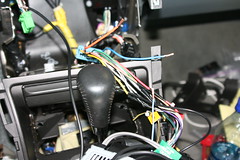
Sorry if the pic is a little small...
Ok, I have the rca cable connected to the correct wires on the Bose EQ harness, but I'm having trouble getting power to the sub. I know there's tons of posts that should've cleared this up, but its still so confusing. I have 3 unconnected wires left, 2 on the crutchfield wiring harness, and one on the wiring harness for my pioneer HU. The two wires in the top of the pic go to the crutchfield wiring harness, one is blue (power antenna turn-on) and one is orange (which I've read is for the power antenna lead, but the manual says its for illumination, thats what makes this all so confusing). The other unconnected wire is on the pioneer wiring harness, its blue with a white stripe (it says to connect it to the control terminal of the power amp).....I've tried connecting all of these wires together in every way possible, nothing happens...Am I missing something? Do I need to connect one of these do a different wire somewhere else? Please help me Garrote!!! I'm sure you know exactly what I'm talking about. I'm sick of looking at this gaping hole in my car.
Intermediate
Joined: Jun 2006
Posts: 46
Likes: 0
From: Chicago, IL
Garrote's DIY is right on the money...Check it out on page 4. You'll want to make the RCA connection to the connector that runs to the EQ. Forget the connectors that were used with your stock HU, they're useless now, except the antenna. You'll have to remove your HU so you can pull the EQ out...I hope you didn't put your whole car back together already. I think the remote wire connection depends on what kind of wiring harness you have. I think Garrote said that it was a orange wire to orange wire connection. For me it was blue to blue. I also recommend using that RCA cable from radioshack that is already stripped at one end and ready to go...Someone mentioned it earlier in this thread. Also use the Y-connector if you have two sub outputs on your HU. I used both and it worked out great. Good luck! Once you get that EQ out you'll see its really quite simple.

2nd Gear
Joined: May 2007
Posts: 2
Likes: 0
this is gonna be my third attempt removing the aftermarket hu to work this stupid sub...
does any1 know how to get to the eq from the front and which screws to look at removing? is there some sort of drawing or explanation here somewhere? im starting to hate my car just becuase of the way acura setup their audio system!!! DAMN THEM!!!!!
not actually hating the car but still frustrating!!!
PLZ HELP
does any1 know how to get to the eq from the front and which screws to look at removing? is there some sort of drawing or explanation here somewhere? im starting to hate my car just becuase of the way acura setup their audio system!!! DAMN THEM!!!!!
not actually hating the car but still frustrating!!!
PLZ HELP
Intermediate
Joined: Jun 2006
Posts: 46
Likes: 0
From: Chicago, IL
Originally Posted by ahmed_elgamal
this is gonna be my third attempt removing the aftermarket hu to work this stupid sub...
does any1 know how to get to the eq from the front and which screws to look at removing? is there some sort of drawing or explanation here somewhere? im starting to hate my car just becuase of the way acura setup their audio system!!! DAMN THEM!!!!!
not actually hating the car but still frustrating!!!
PLZ HELP
does any1 know how to get to the eq from the front and which screws to look at removing? is there some sort of drawing or explanation here somewhere? im starting to hate my car just becuase of the way acura setup their audio system!!! DAMN THEM!!!!!
not actually hating the car but still frustrating!!!
PLZ HELP
7th Gear
Joined: Mar 2007
Posts: 7
Likes: 8
Originally Posted by bangumandoo
i wish it was this simple. ive spent the last 2 days trying every which theory i could find on these 5 pages and no luck so far. i ran the orange wire from the front (power) to the orange wire to power the amp behind the seat and there is definetely power going to the amp. im guessing the only thing left is the signal and ive tried EVERY connection mentioned in the amp and by the EQ and nothing. still no sub working. is there something i have to ground? ive read everything over and over again but im still not gettting the sub to receive teh signal from my HU
Assuming you have the power to your amp like you say, I did a quick and nasty hand sketch to show where you connect the signal wires. If you have only one RCA cable, like I did, just ignore the second one. But my pictures back on page four show this much better than the sketch.

If this doesn't work, then it has to be a power issue. If that's the case, we can troubleshoot from there. Actually, I'd like to know to which wire on your new HU you connected the orange wire from the back. We probably should triple check that so you don't have to take things apart but one more time.
Good luck,
Garrote
Last edited by Jonesi; Oct 6, 2009 at 09:22 PM.

7th Gear
Joined: Mar 2007
Posts: 7
Likes: 8
Originally Posted by bangumandoo
according to your nasty hand sketch my rca connection is correct lol. i dont remember teh color but my new HU was wired into the power wire from the old harness. the radio works perfectly if that makes anyone feel better. i spliced into this wire and ran a wire from this power wire to the orange wire in the sub amp. i hear the amp static when i touch the wires so thats how i know there is power. i everything in this thread word for word and still no sub =*(
1) Check HU settings again. Be very certain that the sub-outs aren't turned off or that their levels aren't set to 0 somewhere. I know that sounds elementary, but that's got to be double-checked. If it still doesn't work, next step.
2) Connect something else with line in jacks, like some boom boxes, to the sub-out jacks and see if there is sound. If there isn't, either the HU is defective or you've still missed a setting somewhere that turns the jacks on. If there is sound, the HU is fine and set correctly, so keep going.
3) If you made it to here, then we're back to square one. Either your RCA jacks or your power supply wire is incorrect.
I don't know if that will help at all, but I hope so.
Good luck,
Garrote
Ackniculous One
Joined: Jun 2003
Posts: 3,100
Likes: 8
From: ATL Shawwwwtyyyy
Originally Posted by CJITTY
From what I hear, you can access the amp wires by removing the plastic kick panel by the front pax door and tap in there instead of taking your seat out and running wires all the way to the back...that's what I plan on doing. A couple folks have done that with success.
Luckily, the short was fixed, but my VSA was out for a couple weeks until I got it fixed. The yaw sensor (below the stock amp), was not getting enough power current and tripped up the VSA system.
 It's fixed, but damn if I wasn't scared I fried the VSA system!!

Cruisin'
Joined: Mar 2007
Posts: 15
Likes: 0

Surfing the internet can be infuriating. I just found this which some may find interesting...
It means I still have a problem.
http://www.bcae1.com/
Select item # 22 from the right side slide bar Entitled - Head Unit.
Connecting to Remote or Power Antenna Outputs.
There may be one or more switched 12 volt outputs on your head unit. These outputs are usually called remote outputs. They are used to control power amplifiers or power antennas. If your unit has only one remote output, 12 volts will be sent through it when any audio source is being used (tuner, CD, tape, aux...). It will be 'hot' (have 12 volts on it) when the head unit is on. It will have no voltage when the head unit is off.
If the unit has two remotes, one wire (generally a dark blue wire with a white stripe* for aftermarket radios) will be for your power antenna and will only have 12 volts on it when you are using the tuner.
It will have no voltage on it when the head unit is switched to CD, tape, aux or is switched off. This is so that your power antenna will go down when it is not needed.
The second output (generally a dark blue wire* for aftermarket radios) will be marked amp remote (or amp turn-on) and will have 12 volts switched to it when any source is in use.
There is a diagram on the test light page that shows both types of outputs.
Please note that the remote wires for stock (OEM) radios will be of a different color (probably not blue). You can refer to the following page for the color code for your vehicle.
Street Dreams
*Some radios use blue with a white stripe for the power antenna and others use it for the amp turn on wire. Just keep in mind that if it has 2 dark blue wires and one has a white stripe and the other is solid blue, those wires are for amp/power antenna control. You'll have to refer to the deck's owner's manual for the color code.
This could be one of the reason why some are having issues.
RJay
It means I still have a problem.
http://www.bcae1.com/
Select item # 22 from the right side slide bar Entitled - Head Unit.
Connecting to Remote or Power Antenna Outputs.
There may be one or more switched 12 volt outputs on your head unit. These outputs are usually called remote outputs. They are used to control power amplifiers or power antennas. If your unit has only one remote output, 12 volts will be sent through it when any audio source is being used (tuner, CD, tape, aux...). It will be 'hot' (have 12 volts on it) when the head unit is on. It will have no voltage when the head unit is off.
If the unit has two remotes, one wire (generally a dark blue wire with a white stripe* for aftermarket radios) will be for your power antenna and will only have 12 volts on it when you are using the tuner.
It will have no voltage on it when the head unit is switched to CD, tape, aux or is switched off. This is so that your power antenna will go down when it is not needed.
The second output (generally a dark blue wire* for aftermarket radios) will be marked amp remote (or amp turn-on) and will have 12 volts switched to it when any source is in use.
There is a diagram on the test light page that shows both types of outputs.
Please note that the remote wires for stock (OEM) radios will be of a different color (probably not blue). You can refer to the following page for the color code for your vehicle.
Street Dreams
*Some radios use blue with a white stripe for the power antenna and others use it for the amp turn on wire. Just keep in mind that if it has 2 dark blue wires and one has a white stripe and the other is solid blue, those wires are for amp/power antenna control. You'll have to refer to the deck's owner's manual for the color code.
This could be one of the reason why some are having issues.
RJay
Last edited by rtraceski; Aug 17, 2007 at 09:59 AM.